
Game Overview
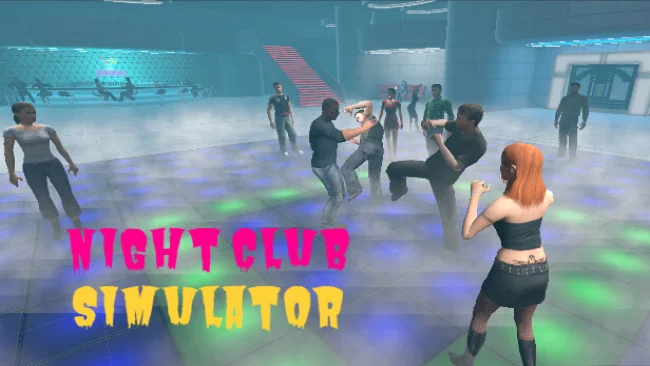
Neon lights, loud music, and unpredictable crowds turn a simple night out into a physics-driven VR sandbox. NightClub Simulator places you inside an interactive club where every encounter can stay friendly, become awkward, or spiral into total disorder depending on how you behave. Its tone leans more toward open-ended chaos than structured nightlife management, letting players test the limits of a lively social space. The attraction is the sense that people around you react rather than merely stand around as scenery.
Hands-on interaction drives the experience, with VR controls used to approach patrons, handle objects, and physically affect the environment. A full-body physics system gives characters weight and responsiveness, so collisions, grabs, and sudden disturbances produce immediate consequences instead of canned animations. NPC behavior is built around changing emotional states: people can appear pleased, irritated, scared, or affectionate, and their reactions shift according to the player’s actions. Causing a scene is possible, but escalating too far brings police attention, creating a basic risk-and-reward layer for players who prefer mayhem over a quiet evening.
What separates NightClub Simulator from a conventional action game is its focus on unscripted social reactions and tactile experimentation. It resembles the freeform messing-about found in physics sandboxes, but frames that impulse within a crowded, adult nightlife setting where the crowd’s mood matters. The club serves as a reactive playground rather than a tightly authored campaign, making repeat sessions more about trying different interactions and seeing how the AI responds. VR veterans who enjoy emergent comedy, physical interaction, and pushing systems until they break are the clearest audience, while newcomers should be comfortable with motion-heavy gameplay and the occasionally unpredictable nature of a simulation-focused sandbox.
Screenshots
Installation
- Select the Download button at the top of this page to open UploadHaven.
- On UploadHaven, wait for any countdown, then select Free Download. Optional: UploadHaven Pro for faster downloads.
- When complete, extract the archive to a NightClub Simulator folder using 7-Zip.
- Open the extracted folder and start the game normally.
- For errors, check Setup Guide & Troubleshooting below. Keep your security software enabled.
System Requirements
- Requires a 64-bit processor and operating system
- OS: Windows 10 64Bit
- Processor: Intel Core i5-4590 / AMD Ryzen 5 2600
- Memory: 8 GB RAM
- Graphics: NVIDIA GTX 970 / AMD Radeon R9 390
- DirectX: Version 11
- Storage: 5 GB available space
- VR Support: OpenXR
Setup Guide & Troubleshooting
How do I fix missing DLL errors for NightClub Simulator (v2026.06.02 & VR)?
After extracting NightClub Simulator (v2026.06.02 & VR), navigate to the _Redist or _CommonRedist folder inside the game directory and install DirectX, Vcredist, and any other dependencies included.
What should I do if the downloaded file is corrupted?
The full archive is 1.12 GB — make sure your download completed fully before extracting. Use 7-Zip to extract the files. If you still see a "file corrupted" error, re-download and try again.
Do I need to run the game as administrator?
Usually, no. Start the game normally from the extracted folder. If you see a permissions or save error, check that the folder is writable and follow the game's documented fix. Only grant administrator access when a trusted game's specific setup requires it.
How do I update my GPU drivers for this game?
The game won't launch — what should I try?
Check that extraction completed and your PC meets the system requirements, including Version 11. Note any error message before choosing a fix. If it identifies a missing runtime, install the required DirectX components or Microsoft Visual C++ Redistributable from Microsoft.
My antivirus is blocking the game — is it safe?
A warning needs to be investigated; the download source alone cannot confirm that a file is safe. Keep your security software enabled and review the detection details. Do not run or restore a flagged file unless you have verified that it is a false positive. If you are unsure, leave it quarantined.